¶ Argon PWR UPS General Info
¶ Overview
The Argon PWR UPS is an uninterruptible power supply designed specifically for Raspberry Pi 4, Raspberry Pi 5, and compatible Argon 40 cases. It delivers up to 27W of USB-C Power Delivery (PD), keeps your system running during unexpected power outages, and triggers a safe, graceful shutdown when the battery is critically low — protecting your data and file system from corruption.
This product is aimed at makers, developers, and anyone running a Raspberry Pi in a production or always-on environment where unexpected power loss is a genuine risk.
¶ What's in the Box
| Item | Quantity |
|---|---|
| Argon PWR UPS Unit | 1 |
| E-Marker USB-C to USB-C Cable | 1 |
| Quick Start Guide | 1 |
📝 Note: A USB-C Power Supply Unit (PSU) is not included. You must supply your own. See Compatible Power Supplies for recommendations.
¶ Parts and Features
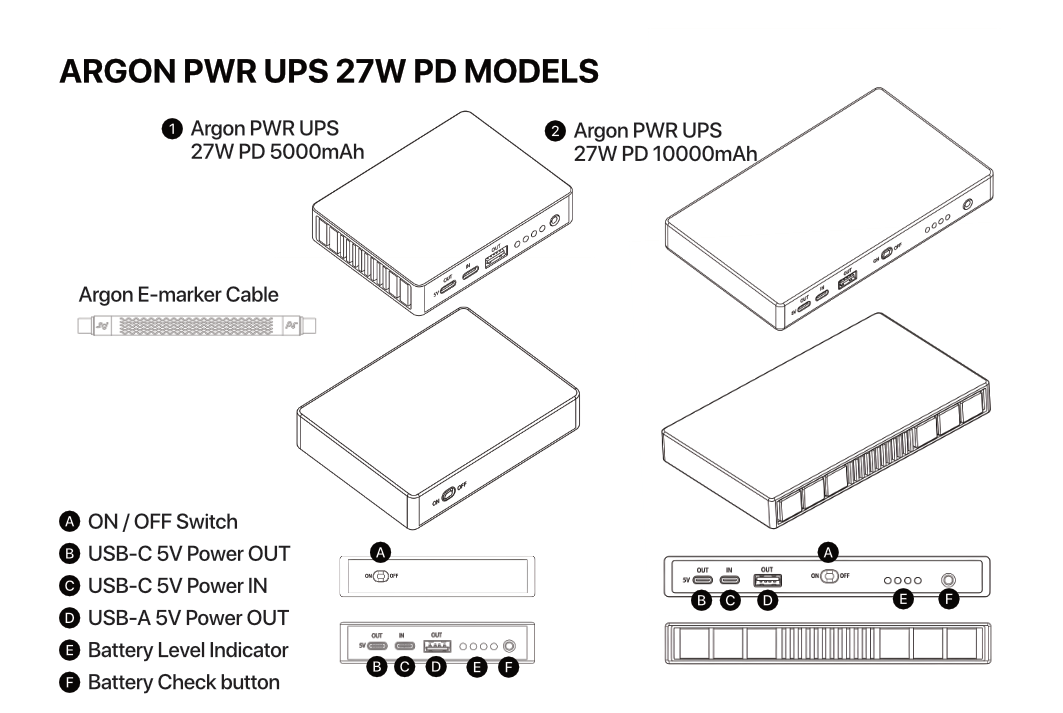
| Label | Component | Description |
|---|---|---|
| IN | USB-C Power IN Port | Accepts USB-C PD input from your wall adapter |
| OUT | USB-C Power OUT Port | Delivers power to your Raspberry Pi or Argon case |
| SW | ON/OFF Switch | Enables or disables power output to the connected device |
| BTN | Battery Check Button | Press to illuminate LEDs and display current charge level |
| LED 1–4 | Battery Level Indicators | Each LED represents approximately 25% of total battery capacity |
¶ Compatibility Matrix
| Device | Basic Power Delivery | UPS Functionality | Safe Shutdown | USB-C PD Negotiation | Recommended PSU | Status |
|---|---|---|---|---|---|---|
| Bare Raspberry Pi 4 | ✅ | ✅ | ✅ | ✅ | 27W | Fully Supported |
| Bare Raspberry Pi 5 | ✅ | ✅ | ✅ | ✅ | 27W | Fully Supported |
| Argon ONE V3 | ✅ | ✅ | ✅ | ✅ | 27W | Fully Supported |
| Argon ONE V5 | ✅ | ✅ | ✅ | ✅ | 27W | Fully Supported |
| Argon NEO | ✅ | ✅ | ✅ | ✅ | 27W | Fully Supported |
| Argon NEO 5 | ✅ | ✅ | ✅ | ✅ | 27W | Fully Supported |
| Argon POLY+ | ✅ | ✅ | ✅ | ✅ | 27W | Fully Supported |
| Argon POLY+5 | ✅ | ✅ | ✅ | ✅ | 27W | Fully Supported |
| Argon ONE V2 | ✅ | ❌ | ❌ | ❌ | 15W–18W | Not Supported |
| Raspberry Pi Zero | ✅ (micro-USB to USB-C cable) | ❌ | ❌ | ❌ | 15W | Not Supported |
| Raspberry Pi Zero W | ✅ (micro-USB to USB-C cable) | ❌ | ❌ | ❌ | 15W | Not Supported |
¶ Legend
| Symbol | Meaning |
|---|---|
| ✅ | Supported |
| ❌ | Not Supported |
- Basic Power Delivery: The device can receive standard power from the UPS output (fallback input, no smart features).
- UPS Functionality: The UPS actively monitors power and switches to battery when mains power is lost.
- Safe Shutdown: The UPS communicates with the OS via USB-C OTG to trigger a graceful shutdown at low battery.
- USB-C PD Negotiation: The UPS and device negotiate a higher-power profile (e.g., 5V/5A) via the USB PD protocol.
- Recommended PSU (W): Suggested minimum USB-C power adapter wattage for stable operation under load.
¶ Notes
⚠️ Warning: Devices listed as Not Supported (Argon ONE V2, Raspberry Pi Zero series) must not be used for UPS functionality. They lack the USB-C OTG communication pathway required for safe shutdown and PD negotiation.
- A 27W USB-C PD adapter is the recommended minimum for stable operation, particularly for the Raspberry Pi 5 under sustained load.
- Using a lower-wattage adapter may trigger undervoltage conditions, resulting in performance throttling, instability, or a warning lightning bolt icon in the desktop taskbar.
- The Argon ONE V2 supports only basic power input via the UPS and does not support UPS functionality, safe shutdown, or USB-C PD negotiation.
¶ Assembly & Setup
¶ Overview of the Connection
Before powering anything on, understand the signal flow:
Wall Outlet → USB-C PSU → UPS IN Port → UPS (battery management) → UPS OUT Port → Argon Case / Raspberry Pi
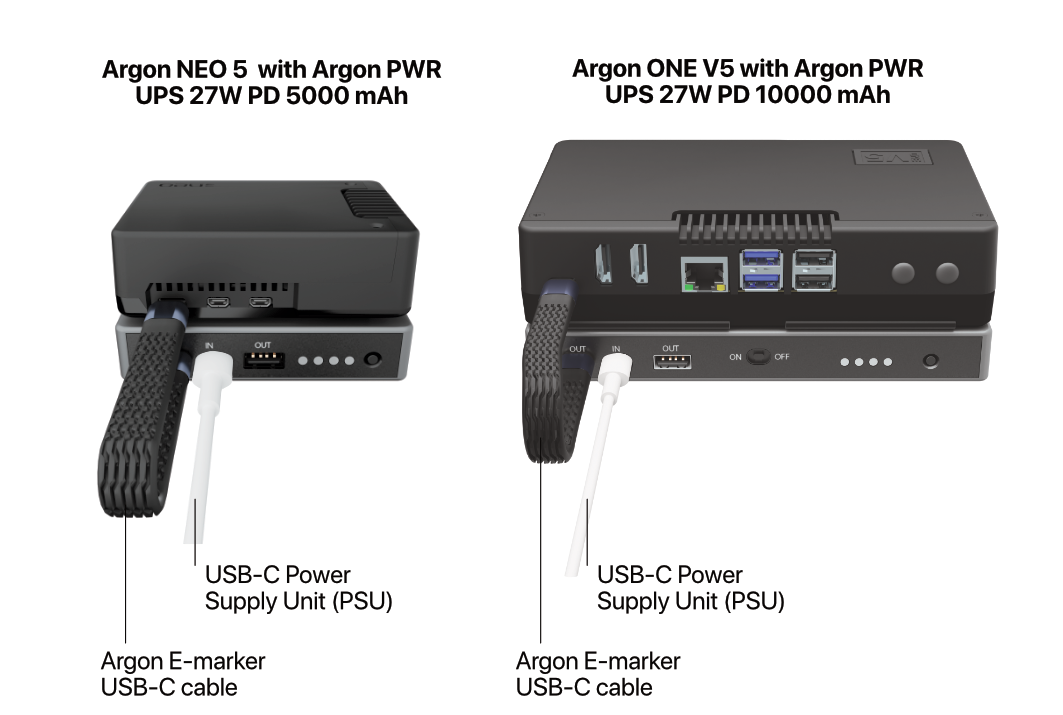
The UPS sits between your wall adapter and your Raspberry Pi. The E-Marker cable carries both power and the PD negotiation signals between the UPS and the Pi.
¶ 1. Physical Connection
Follow these steps in order to avoid incorrect wiring:
Power everything off. Ensure your Raspberry Pi and Argon case are fully shut down before making any connections.
Connect the E-Marker cable to the UPS OUT port. Plug one end of the supplied E-Marker USB-C cable firmly into the OUT port on the Argon PWR UPS.
Connect the other end to your Raspberry Pi or Argon case. Plug the other end into the USB-C Power In port on your Argon NEO 5, Argon ONE V5, or directly into the Raspberry Pi 4/5 USB-C power port.
Connect your USB-C PSU to the UPS IN port. Plug your compatible USB-C power adapter into the IN port on the Argon PWR UPS.
Plug the PSU into the wall outlet.
Toggle the ON/OFF switch on the UPS to power the connected device.
⚠️ Warning: Always use the supplied E-Marker USB-C cable for the UPS OUT → device connection. Using a standard USB-C cable will prevent full PD negotiation, throttle USB port current on the Pi 5, and may cause undervoltage warnings. See Smart Cable Detection & Power Delivery for details.
📝 Note: Make sure both the USB-C Power IN and Power OUT connectors are fully seated. A partially inserted cable is the most common cause of intermittent power issues.
¶ 2. Battery Level Indicator Behavior
| Action | LED Behavior |
|---|---|
| Press Battery Check Button | LEDs illuminate for ~1 second to indicate current battery charge level |
| Charging (Power IN connected) | LEDs blink continuously, reflecting current charge level until fully charged |
| Fully Charged (Power IN connected) | All four LEDs remain steadily lit |
| Discharging (Power OUT with load, no Power IN) | LEDs remain off; press the Battery Check Button to display current charge level |
📝 Note: Each LED represents approximately 25% of total battery capacity. For example, two solid LEDs indicate roughly 50% charge.
¶ 3. Compatible Power Supplies
The Argon PWR UPS accepts USB-C Power Delivery (PD) input only. A standard 5V USB-A adapter is not compatible with the IN port. Use a PSU that meets or exceeds the recommended wattage to ensure adequate headroom for both running the system and simultaneously charging the UPS battery.
| USB-C PSU Type | Compatibility | Recommended Use |
|---|---|---|
| 5V 18W | Minimum | Light use only; battery charging will be slow and system stability is not guaranteed under load |
| 27W PD | Recommended | Standard Raspberry Pi 5 / Argon ONE V5 / Argon NEO 5 setups |
| 45W PD | Optimal | High-performance setups with NVMe drives, multiple USB peripherals, or heavy CPU loads |
⚠️ Warning: Do not use adapters rated below 18W. The UPS requires sufficient overhead to simultaneously power the Pi and charge its internal battery. Inadequate input power can cause the battery to drain even when mains power is connected.
¶ Argon Script and Configuration
The Argon PWR UPS requires a software script to enable safe shutdown, battery monitoring, and UPS event handling at the OS level.
¶ If You Already Have an Argon Case Script Installed
If you have already installed the argon-config script for the Argon NEO 5 or Argon ONE V5, you do not need to run a separate installation:
- Open a terminal.
- Run
argon-config. - Navigate to the UPS section in the menu.
- Enable UPS functionality.
¶ Standalone Installation (All Other Setups)
Use this procedure if you are running a bare Raspberry Pi 4 or Pi 5, or any supported device that does not already have the Argon config script installed.
¶ Step 1 — Run the Installation Script
Open a terminal and run the following command. This works on Raspberry Pi OS and Ubuntu:
curl https://download.argon40.com/argonpwrups.sh | bash
The script will:
- Install the UPS monitoring daemon
- Configure the I²C/OTG communication between the UPS and the Pi
- Register the safe-shutdown service to start automatically on boot
¶ Step 2 — Reboot the System
After installation completes, reboot for all changes to take effect:
sudo reboot
¶ Step 3 — Run the Argon UPS Configuration Tool
Once the system has rebooted, open a terminal and launch the configuration menu:
argon-config
Use the on-screen menu to configure:
- Low-battery shutdown threshold (percentage at which the Pi begins a graceful shutdown)
- UPS mode enable/disable
- Battery status monitoring interval
📝 Note: The configuration tool is labelled Argon ONE UPS Configuration in the menu. This is correct — it applies to all supported Argon UPS products, not just the ONE series.
¶ Smart Fuel Gauge Calibration
The Argon PWR UPS contains a smart fuel gauge IC that estimates remaining battery capacity and runtime. Out of the box, this gauge uses factory defaults and may not accurately reflect your specific setup's power draw.
To calibrate the fuel gauge to your system, complete one full charge–discharge cycle:
Fully charge the Argon PWR UPS to 100%.
The battery indicator LEDs will stop blinking and remain steadily lit when charging is complete.
Disconnect the external power source (wall adapter).
The UPS will now run entirely from its internal battery.
Continue operating the system normally — run your typical workload — until the UPS battery is fully depleted and the system shuts down automatically.
Reconnect the wall adapter and allow the UPS to charge fully again before resuming normal use.
📝 Note: This calibration cycle only needs to be performed once after initial setup, or after an extended period of storage. It allows the fuel gauge to learn the true usable capacity of the battery under your specific Raspberry Pi load, improving the accuracy of charge level readings and low-battery shutdown timing.
⚠️ Warning: Do not interrupt the discharge cycle by reconnecting mains power partway through. An incomplete cycle will not calibrate the fuel gauge correctly.
¶ Smart Cable Detection & Power Delivery
¶ 1. Overview of the E-Marker Requirement
The Argon PWR UPS ships with a specialized USB-C to USB-C E-Marker cable. This cable must be used for the UPS OUT → Raspberry Pi / Argon case connection. Using any other cable — even a high-quality standard USB-C cable — will result in reduced functionality.
¶ What Is an E-Marker Cable?
An E-Marker (Electronic Marker) cable contains a small integrated circuit (IC) embedded inside one or both connector housings. This chip acts as a digital identity card that communicates with both the Argon UPS and the connected Raspberry Pi.
- Identity: It tells both devices the cable's maximum current and voltage rating (5A / 20V in this case).
- Safety: It prevents either device from attempting to draw more current than the cable's copper conductors can safely carry.
- Negotiation: It enables the full USB PD 3.0 handshake required to unlock higher power profiles on the Raspberry Pi 5.
¶ 2. Importance for Raspberry Pi 5
The Raspberry Pi 5 introduced a stricter Power Delivery handshake compared to the Pi 4. To unlock its full USB port capability and avoid performance throttling, the Pi 5 must detect a 5V / 5A (25W–27W) power profile.
| Condition | Result |
|---|---|
| Standard cable detected (no E-Marker) | Pi 5 defaults to a 3A current limit; USB ports limited to 600mA total |
| E-Marker cable detected | Pi 5 unlocks 5A delivery; USB ports can supply up to 1.6A for high-draw peripherals |
- The 5A Handshake: Without an E-Marker cable, the Pi 5 PD controller caps current at 3A as a safety precaution — regardless of what the PSU or UPS is capable of delivering.
- USB Peripheral Throttling: A standard cable causes the Pi 5 to limit combined USB port current to 600mA total, which can cause NVMe drives, external HDDs, and powered hubs to fail or behave erratically.
- Full Power Unlock: The Argon E-Marker cable signals 5A capability, unlocking up to 1.6A for USB peripherals and eliminating the under-voltage warning.
¶ 3. Compatibility with Argon Cases
The Argon PWR UPS communicates with the Raspberry Pi 4 and Pi 5 via the USB-C OTG protocol. This means it integrates seamlessly with enclosures that pass the USB-C power port through without a daughter board:
Compatible cases:
- Argon ONE V5
- Argon ONE V3
- Argon NEO 5
- Argon NEO
- Argon POLY+
- Argon POLY+5
Not compatible:
- Argon ONE V2 — uses a GPIO-based power management board that does not pass USB-C OTG signals
- Argon POD cases — internal architecture is incompatible with the UPS OTG communication pathway
⚠️ Warning: Do not attempt to use the Argon PWR UPS with the Argon ONE V2 or POD cases for UPS or safe-shutdown functionality. Basic power delivery may pass through, but the system will not receive low-battery shutdown signals, which risks data loss and file system corruption during a power outage.
Using the E-Marker cable is especially important for case setups because:
- Passive Power Loss: The internal PCB traces of Argon cases introduce a small amount of electrical resistance. The E-Marker cable ensures the UPS can compensate and maintain a stable 5.1V output at the Pi's power input pins.
- Thermal Durability: The Argon E-Marker cable is rated for the higher thermal loads generated during rapid UPS charging while the Pi 5 is simultaneously under full load.
¶ 4. Feature Matrix: E-Marker vs. Standard Cable
| Feature | Argon E-Marker Cable | Standard USB-C Cable |
|---|---|---|
| Max Current | 5A | 3A (typical) |
| Pi 5 USB Port Limit | 1.6A (Unlocked) | 600mA (Throttled) |
| UPS Charging Speed | Fast / Optimized | Slow / Restricted |
| System Stability | High — no undervoltage warnings | Risk of "Low Voltage" warnings under load |
| Safe Shutdown Signal | ✅ Passed through | ❌ May be interrupted |
| Full PD Negotiation | ✅ 5V/5A profile negotiated | ❌ Capped at 5V/3A |
¶ 5. Summary
📝 Wiki Note: To maintain the full integrity of the UPS system, the E-Marker cable is not optional. It serves as the communication bridge that allows the Raspberry Pi 5 to trust the power source, ensures the OS does not throttle performance, and guarantees that all connected USB devices receive adequate current during power-switching events. Always use the supplied Argon E-Marker cable between the UPS OUT port and your device.
¶ Troubleshooting
¶ Symptom → Cause → Fix
1. The Raspberry Pi shows a lightning bolt / low voltage warning icon even though the UPS is connected
- Cause: A standard (non-E-Marker) cable is being used between the UPS OUT port and the Pi, capping current at 3A. Alternatively, the PSU wattage is below the recommended 27W.
- Fix: Confirm you are using the supplied E-Marker cable. If the cable is correct, replace the wall adapter with a 27W or higher USB-C PD adapter. Check that both ends of the cable are fully seated.
2. UPS does not switch to battery power when the wall adapter is unplugged
- Cause A: The UPS ON/OFF switch is in the OFF position.
- Cause B: The battery is fully depleted and needs charging before it can supply power.
- Cause C: The E-Marker cable is not properly seated in the OUT port.
- Fix: Toggle the ON/OFF switch to ON. Connect the PSU and charge the UPS until at least one LED is steadily lit before testing again. Re-seat the cable firmly.
3. The system does not perform a safe shutdown when the battery is low
- Cause A: The
argonpwrupsdaemon is not installed or is not running. - Cause B: The UPS and Pi are not communicating over the USB-C OTG channel (wrong cable or incompatible case).
- Fix: Verify the script is installed and the service is active:
sudo systemctl status argonpwrups
If the service is not running, restart it:
sudo systemctl restart argonpwrups
If the service is missing entirely, re-run the installation script:
curl https://download.argon40.com/argonpwrups.sh | bash
Confirm you are not using an Argon ONE V2 or POD case, which do not support the OTG communication path.
4. Battery level LEDs are inaccurate — the UPS shuts down earlier or later than expected
- Cause: The smart fuel gauge has not been calibrated to your specific system's power draw.
- Fix: Perform a full charge–discharge calibration cycle as described in the Smart Fuel Gauge Calibration section. This only needs to be done once.
5. USB peripherals (NVMe drive, external HDD) are not detected or intermittently disconnect
- Cause: The Pi 5 is operating in throttled USB mode (600mA total) because a non-E-Marker cable is in use, or the PSU cannot supply sufficient wattage.
- Fix: Replace the cable with the supplied Argon E-Marker cable. Upgrade the wall adapter to a 45W PD adapter for setups with NVMe drives or multiple high-draw peripherals.
6. The UPS battery drains even when the wall adapter is plugged in
- Cause: The wall adapter wattage is insufficient to simultaneously power the Pi and charge the battery. The system is drawing more than the adapter can supply, and the UPS is compensating by discharging its battery.
- Fix: Upgrade to a 27W or 45W USB-C PD adapter. Check that the adapter is plugged into the UPS IN port (not the OUT port).
7. argon-config does not show a UPS menu option
- Cause: The standalone
argonpwrupsscript was not installed, or an older version ofargon-configis present from a previous Argon case installation. - Fix: Run the standalone UPS installation script:
curl https://download.argon40.com/argonpwrups.sh | bash
Then reboot and re-run argon-config. If the UPS menu still does not appear, update your Argon scripts:
curl https://download.argon40.com/argon1.sh | bash
sudo reboot
¶ FAQ
Q1: Do I need to install the script if I already have argon-config installed for my Argon case?
No. If you already have argon-config installed for the Argon NEO 5 or Argon ONE V5, simply open the configuration menu by running argon-config and enable UPS functionality from within the menu. No separate script installation is needed.
Q2: Can I use any 27W USB-C charger, or does it have to support PD specifically?
It must support USB-C Power Delivery (PD). A 27W USB-C charger that does not support PD negotiation will not trigger the required 5V/5A profile and may operate only at 5V/3A, reducing headroom. Look for a charger explicitly labelled USB-C PD or Power Delivery.
Q3: How long will the UPS keep my Raspberry Pi running during a power outage?
Runtime depends on the battery capacity of your specific UPS model and your system's current power draw. A Raspberry Pi 5 at idle draws approximately 3–5W, while under full load with NVMe storage it may draw 10–15W. For an accurate runtime estimate, calibrate the fuel gauge as described in the Smart Fuel Gauge Calibration section — the software will then report estimated runtime in argon-config.
Q4: Can I use the Argon PWR UPS to power two Raspberry Pi boards simultaneously?
No. The UPS has a single OUT port and is designed to power one device at a time. Connecting a USB hub or splitter off the OUT port to feed multiple Pi boards is not supported and may cause instability or insufficient power delivery to each device.
Q5: What happens if I use a standard USB-C cable instead of the supplied E-Marker cable?
The system will still power on, but with reduced capability:
- The Raspberry Pi 5 USB ports will be capped at 600mA total (throttled mode).
- PD negotiation will max out at 5V/3A instead of 5V/5A.
- You may see a low-voltage warning icon in the desktop environment.
- NVMe drives and other high-draw USB devices may fail to operate reliably.
Always use the supplied E-Marker cable for the UPS OUT → device connection.
Q6: Is the Argon PWR UPS compatible with the Raspberry Pi 4?
Yes. The Raspberry Pi 4 is fully supported for basic power delivery, UPS functionality, and safe shutdown. However, the Pi 4 does not perform the same PD 5A handshake as the Pi 5, so the USB port throttling behaviour described for the Pi 5 does not apply. A 27W adapter is still recommended for headroom during battery charging.
Q7: Can I replace or expand the internal battery?
The Argon PWR UPS uses an internal lithium battery. Battery replacement is not a user-serviceable procedure. Contact Argon 40 support if your battery no longer holds a charge after the product's expected service life.
Q8: The LEDs blink but the Pi never receives power. What is wrong?
The UPS is charging but the ON/OFF switch may be in the OFF position, or the OUT cable is not connected to the Pi's power port. Check the switch position and re-seat the E-Marker cable in both the UPS OUT port and the Pi's USB-C power input.
📋 Page Info
Revision: 1 · Published: 2026-07-24 08:27 UTC
Managed by Argon Wiki Tool · View live page