¶ Argon ONE V5 NVMe
A full-aluminum Raspberry Pi 5 case with M.2 NVMe PCIe storage expansion, active cooling, and a built-in DAC — designed for makers and developers who need serious storage performance in a compact enclosure.
¶ Overview
The Argon ONE V5 NVMe is a premium aluminum enclosure built specifically for the Raspberry Pi 5, combining passive and active thermal management with flexible M.2 NVMe PCIe storage expansion. The top shell is injected aluminum alloy for heat dissipation, paired with an injected ABS plastic bottom, and a 30mm blower-type PWM fan that is actively controlled by Raspberry Pi OS. The case converts the Raspberry Pi 5's two micro-HDMI outputs to full-size HDMI ports, adds two front-facing USB 2.0 ports via an FE1.1S USB Hub Chip, and provides a built-in 3.5mm audio output and microphone input powered by the HS100B DAC Chip.
What sets the V5 NVMe apart is its modular NVMe expansion system. You can choose from five different M.2 NVMe PCIe board variants — single, dual, or quad drive configurations — spanning PCIe Gen 2 and Gen 3 speeds, using the ASM1182e and ASM2806 packet-switching chips respectively. All boards support 2230, 2242, 2260, and 2280 form factors, and each drive is cooled with included aluminum THRML heatsinks and blue silicone thermal pads.
Optional add-on modules — including a 1.8-inch OLED status display and a Zigbee module for Home Assistant — slot into the case via the GPIO header and an internal USB port, making the V5 NVMe a capable hub for smart home, media server, or development workloads.
¶ What's in the Box
- Argon ONE V5 top case section (injected aluminum alloy)
- Argon ONE V5 middle case section
- Argon ONE V5 bottom case section (injected ABS plastic)
- HDMI-Audio board (USB 2.0 + audio + HDMI conversion)
- 30mm PWM blower fan
- U-shaped PCIe connector (for NVMe board to Raspberry Pi 5 PCIe port)
- THRML aluminum M.2 NVMe heatsink
- Silicone thermal pads — transparent (for CPU, RP1, PMIC, and RAM chips)
- Silicone thermal pads — blue (for NVMe drives)
- Black NVMe supplemental power cable
- 8× flat-head screws (M2.5 × 6 mm)
- 4× round-head screws (M2.5 × 8 mm)
📝 Note: The Raspberry Pi 5, microSD card, and M.2 NVMe SSD drives are not included and must be purchased separately.
¶ Hardware Specifications
| Specification | Value |
|---|---|
| Compatible SBC | Raspberry Pi 5 only |
| Case Material (top) | Injected aluminum alloy |
| Case Material (bottom) | Injected ABS plastic |
| Active Cooling | 30mm blower-type PWM fan, software-controlled via Raspberry Pi OS |
| Passive Cooling | Aluminum alloy case body; aluminum THRML heatsinks on NVMe bottom |
| HDMI Ports | 2× full-size HDMI (converted from Raspberry Pi 5 micro-HDMI) |
| Front USB 2.0 Ports | 2× USB 2.0 (via FE1.1S USB Hub Chip) |
| USB 3.0 Ports | 2× USB 3.0 (passed through from Raspberry Pi 5) |
| Ethernet | Gigabit Ethernet (via Raspberry Pi 5) |
| Audio | 3.5mm audio out + 3.5mm mic in (via HS100B DAC Chip) |
| GPIO | Full 40-pin passthrough header with magnetic cover |
| Power Input | USB-C (via Raspberry Pi 5; recommended 27W Power Delivery) |
| Power Button | Programmable; supports safe shutdown |
| M.2 Form Factors Supported | 2230, 2242, 2260, 2280 |
| NVMe Board Variants | Single (Gen 2), Dual Gen 2, Quad Gen 2, Dual Gen 3, Quad Gen 3 |
| Gen 2 PCIe Switch Chip | ASM1182e (1× PCIe x1 Gen 2 upstream → 2× PCIe x1 Gen 2 downstream) |
| Gen 3 PCIe Switch Chip | ASM2806 (PCIe Gen 3 packet switching) |
| Model No. / MPN | A24-005-AR-V5-NVME-S |
| UPC / EAN | 5065019946164 |
| Product Dimensions | 10.00 × 4.00 × 16.50 cm |
| Product Weight | 0.355 kg |
| HTS Code | 8473.30.5100 |
¶ Compatible Devices
¶ Raspberry Pi 5
The Raspberry Pi 5 is the first Raspberry Pi to feature a dedicated PCIe 2.0 ×1 connector, enabling high-speed NVMe storage expansion — the core capability that the Argon ONE V5 NVMe is built around.
Source: raspberrypi.com
| Spec | Value |
|---|---|
| Processor | Broadcom BCM2712; 2.4 GHz quad-core 64-bit Arm Cortex-A76 |
| GPU | VideoCore VII; supports OpenGL ES 3.1, Vulkan 1.2 |
| RAM | 2 GB, 4 GB, 8 GB, or 16 GB LPDDR4X-4267 |
| Built-in Storage | microSD card slot (UHS-I) |
| Storage Expansion | PCIe 2.0 ×1 connector (M.2 NVMe via Argon ONE V5 NVMe board) |
| Wi-Fi | Dual-band 802.11ac (2.4 GHz + 5 GHz) |
| Bluetooth | Bluetooth 5.0 / BLE |
| Ethernet | Gigabit Ethernet (RJ45) |
| USB | 2× USB 3.0 (5 Gbps), 2× USB 2.0 |
| HDMI | 2× micro-HDMI (up to 4Kp60 simultaneous) — converted to full-size HDMI by V5 case |
| GPIO | 40-pin standard Raspberry Pi GPIO header |
| Power Input | USB-C Power Delivery (PD) |
| Recommended PSU | 5 V / 5 A (27 W PD); minimum 5 V / 3 A (15 W) |
| Real-Time Clock | Yes, with onboard battery connector |
| OS Support | Raspberry Pi OS (64-bit recommended), Ubuntu, other third-party distributions |
| Dimensions | 85 mm × 56 mm |
Compatibility notes for use with Argon ONE V5 NVMe:
- The Argon ONE V5 NVMe is designed exclusively for the Raspberry Pi 5. No other Raspberry Pi models are compatible.
- The U-shaped PCIe connector links the Raspberry Pi 5's PCIe port to the NVMe expansion board. When inserting, the copper side of the connector must face the white side of the Raspberry Pi 5 PCIe terminal.
- The Raspberry Pi 5 natively supports PCIe Gen 2. Using Gen 3 NVMe boards (ASM2806 chipset) requires an additional dtoverlay entry in /boot/firmware/config.txt — see Software & Configuration.
- The 27W Power Delivery supply is strongly recommended, especially with multi-drive NVMe configurations. The Argon PWR GaN 27W and Argon PWR UPS for Argon ONE V5 are compatible accessories.
¶ Assembly Guide
⚠️ Warning: Power off and disconnect the Raspberry Pi 5 from all power sources before beginning assembly. Static discharge can damage the board — handle it by the edges and avoid touching exposed pins or solder joints.
¶ Step 1 — Prepare the Raspberry Pi 5
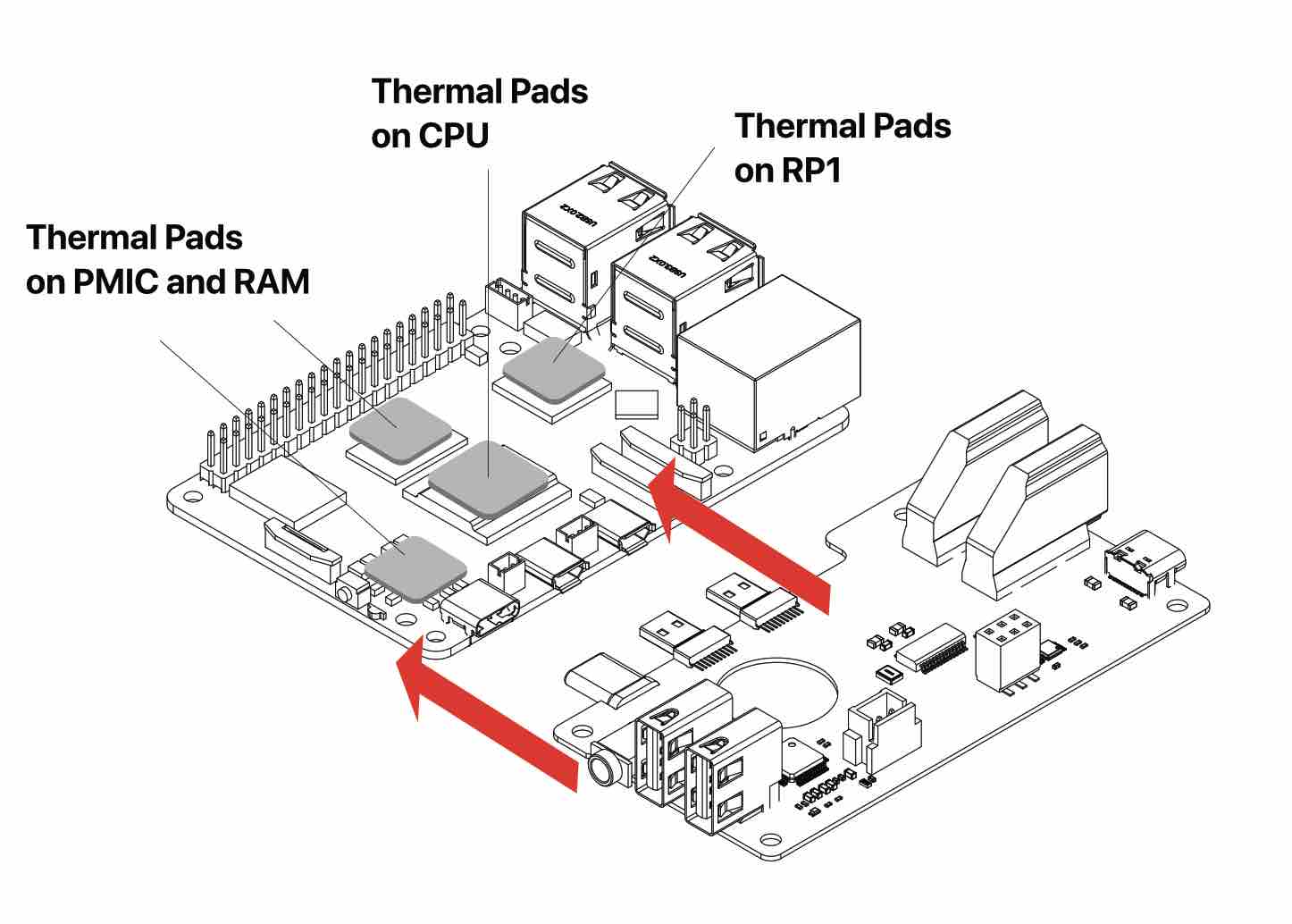
- Connect the Raspberry Pi 5 to the HDMI-USB2-Audio Board.
- Place silicone thermal pads on the CPU, RP1, PMIC, and RAM chips on the Raspberry Pi 5.
⚠️ Warning: Remove the transparent backing from both sides of each thermal pad before application. Leaving the backing on will prevent proper thermal contact and may cause overheating.
¶ Step 2 — Route Internal Cables
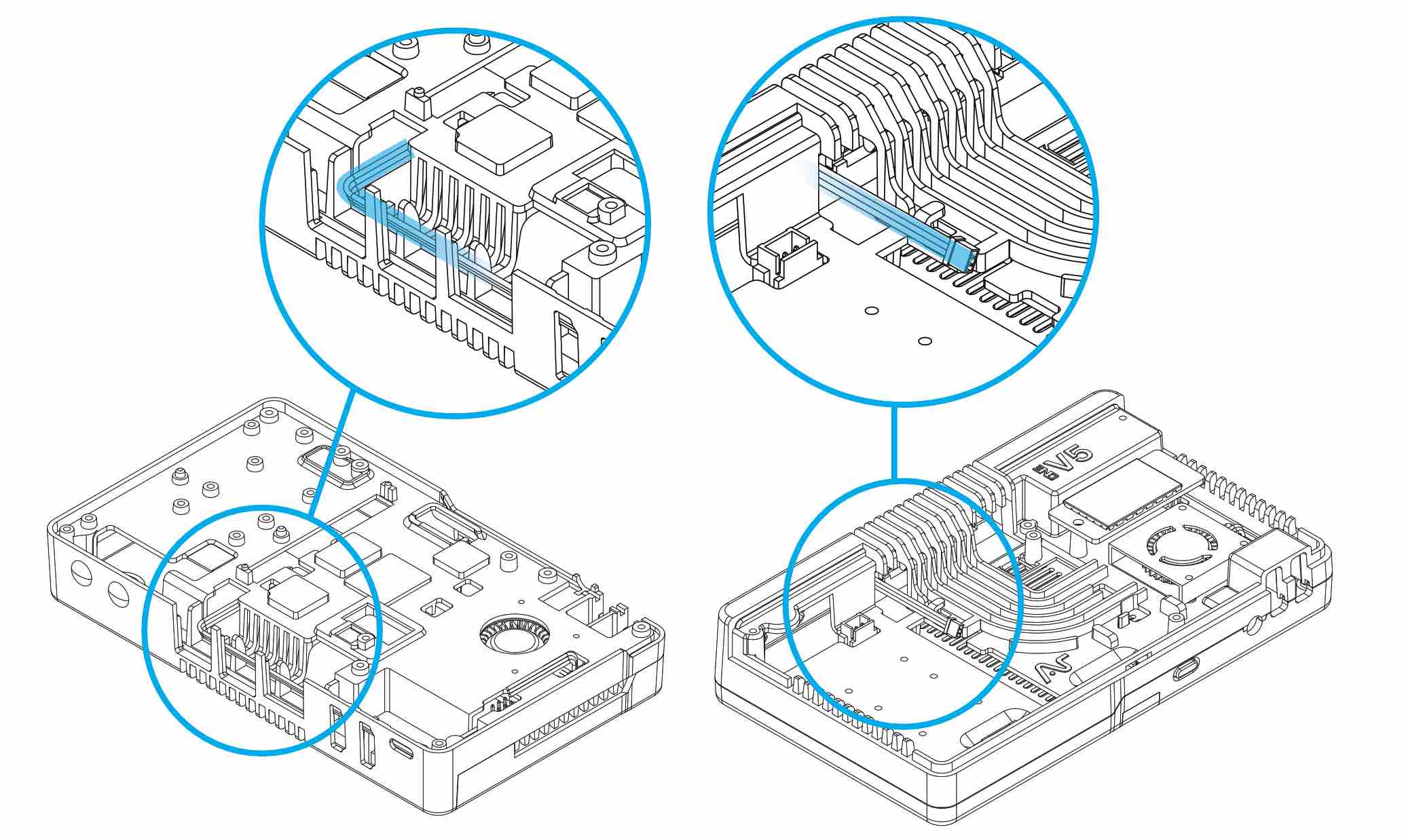
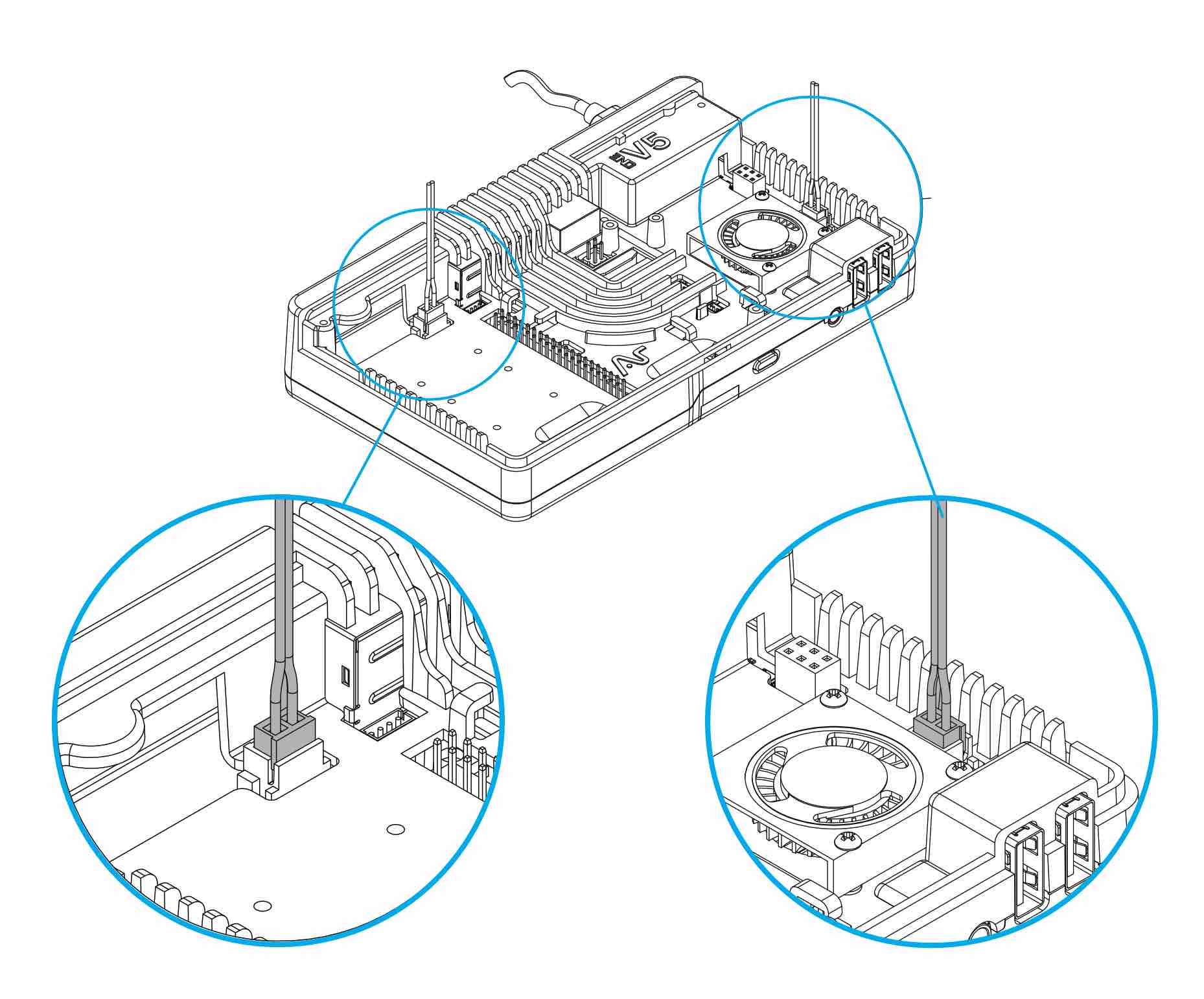
Route the 30mm fan cable and the black NVMe supplemental power cable through the guide posts on the underside of the Argon ONE V5 case — or through the top built-in cable management wire posts.
📝 Note: Route both cables before installing the Raspberry Pi 5 assembly. Doing so after installation significantly restricts access and makes clean cable routing difficult.
¶ Step 3 — Install Raspberry Pi 5 + HDMI-Audio Board Assembly
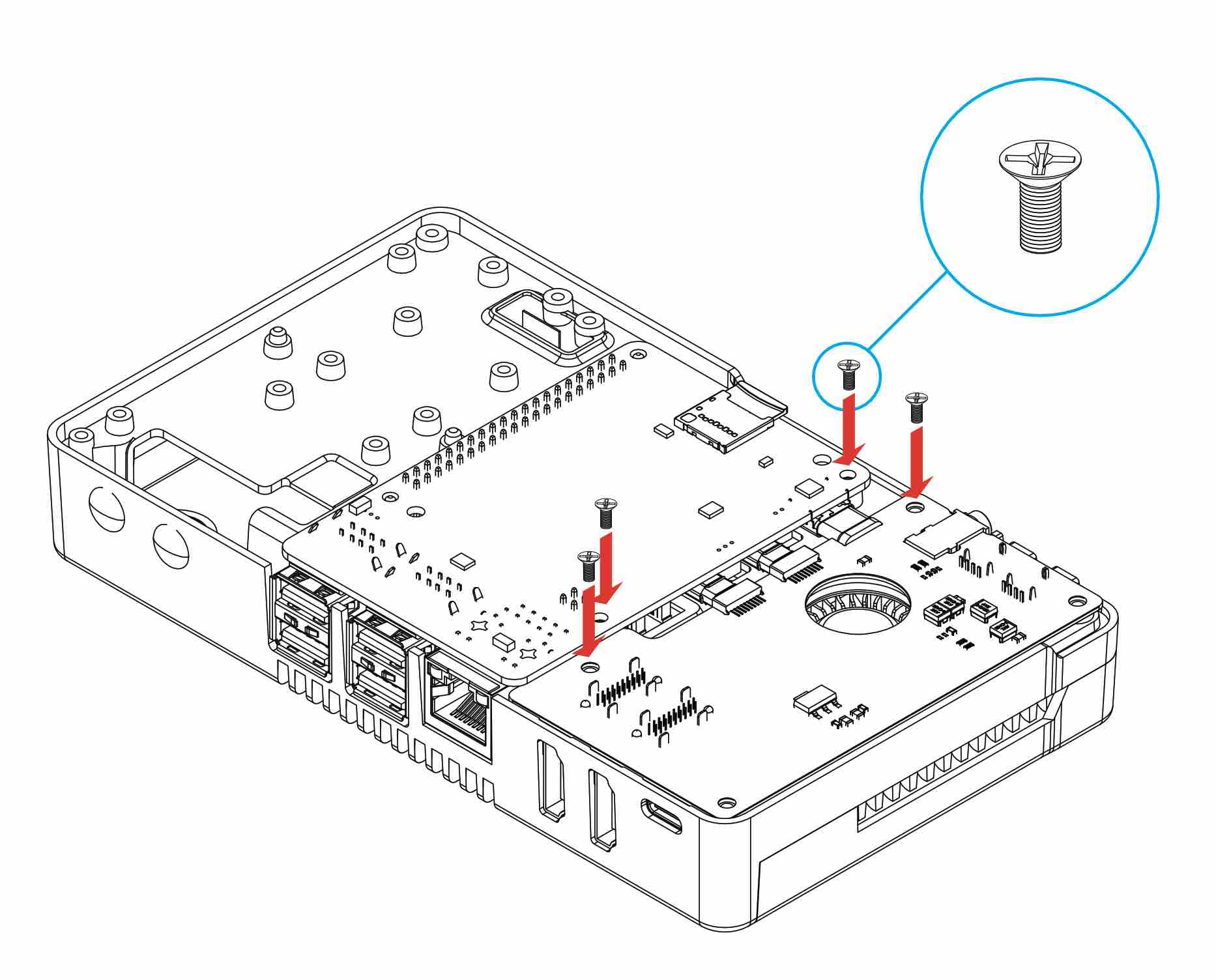
- Place the Raspberry Pi 5 and HDMI-Audio Board assembly into the V5 case.
- Align all port cutouts before seating the assembly fully.
- Secure with 4 flat-head screws (M2.5 × 6 mm) — finger-tighten in a diagonal pattern to seat evenly, then fully tighten.
¶ Step 4 — Connect the Fan
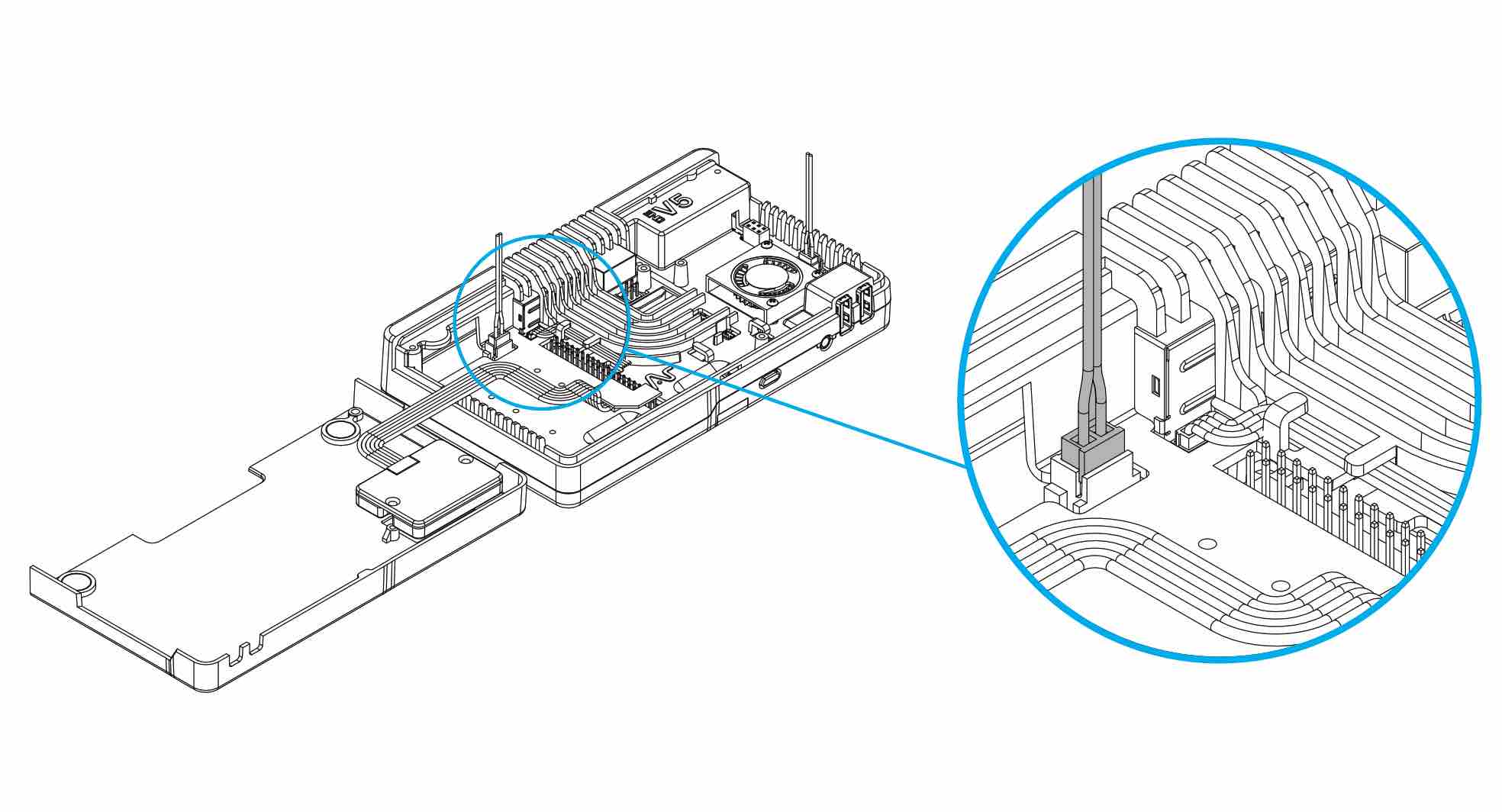
Connect the blower fan cable (colored wires) to the exposed Raspberry Pi 5 FAN port.
📝 Note: The fan is PWM-controlled by Raspberry Pi OS. It will not spin at full speed constantly — this is expected behavior. Install the Argon ONE V5 software (see Software & Configuration) to configure fan speed thresholds.
¶ Step 5 — Connect Supplemental NVMe Power
Connect the black NVMe power cable to the supplemental power supply input on the NVMe board.
📝 Note: This supplemental power cable is required for Dual and Quad drive NVMe boards. The single-drive variant draws power only from the native Raspberry Pi 5 PCIe connection.
⚠️ Warning: Do not omit this cable on multi-drive configurations. Insufficient power delivery to multiple NVMe drives will cause drive detection failures, data corruption, or unexpected shutdowns.
Route the cable inside the case. Refer to Step 2 for placement guidance.
¶ Step 6 — Install M.2 NVMe Drives
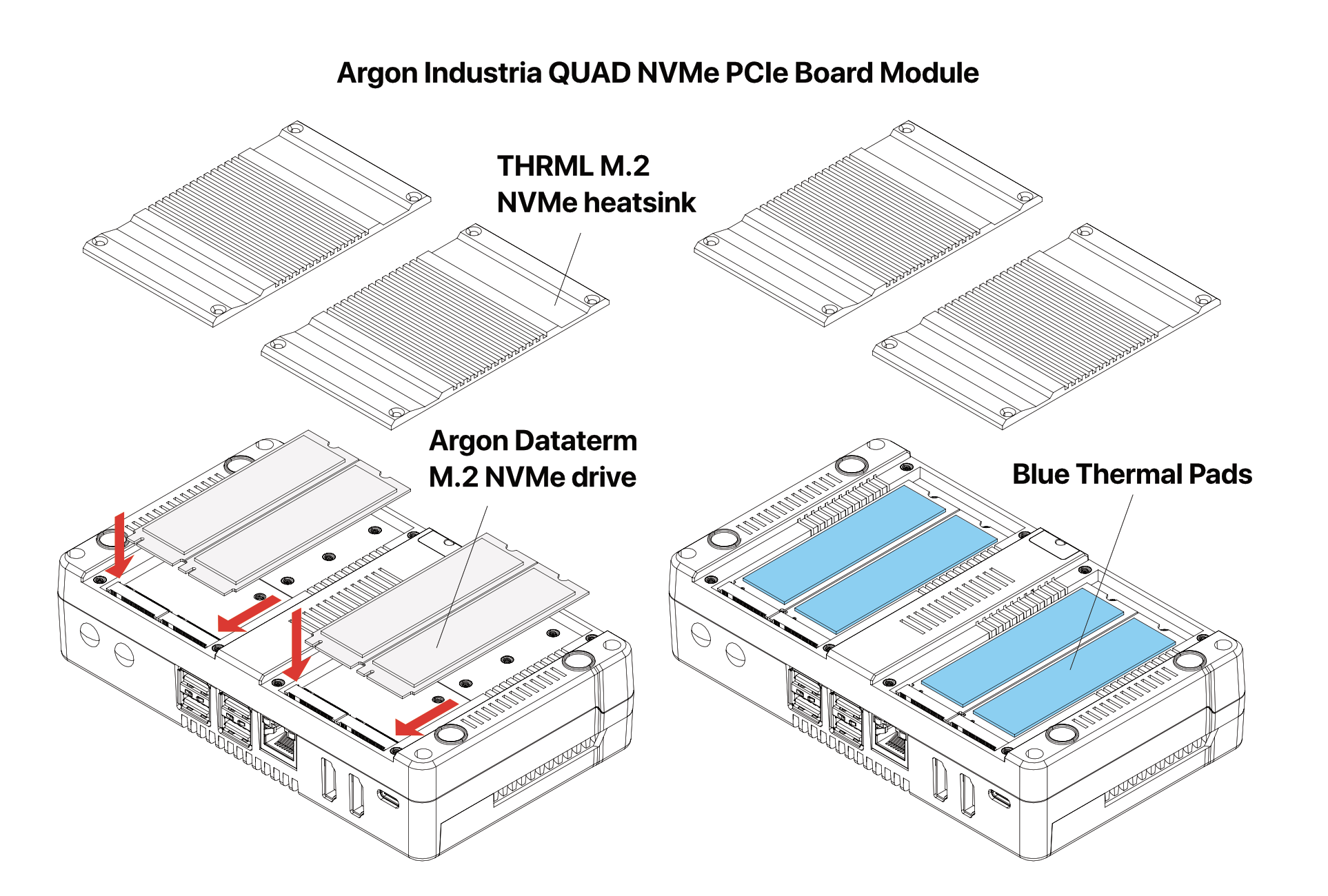
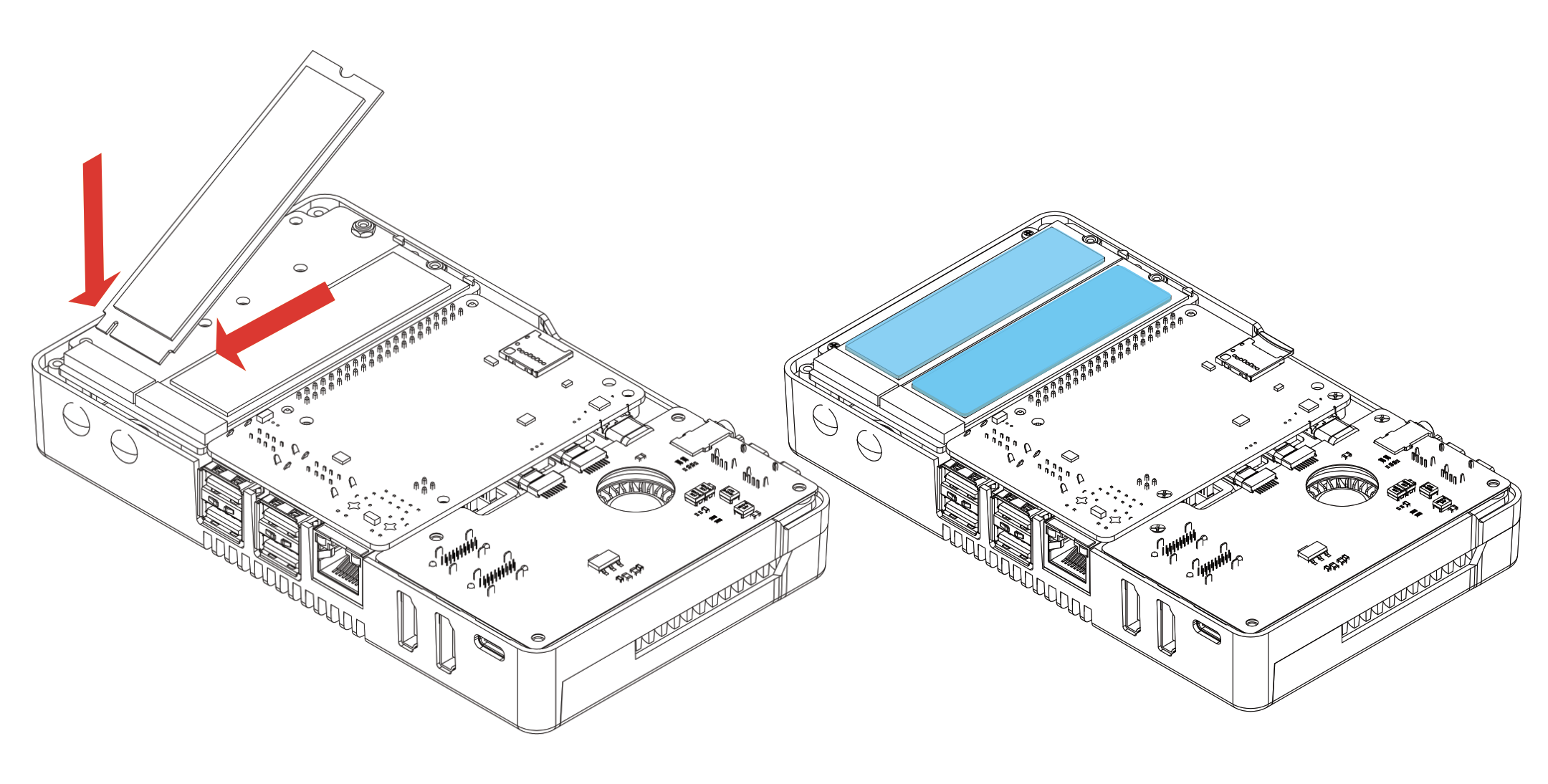
- Insert your M.2 NVMe SSD(s) into the M.2 slot(s) on the NVMe PCIe board at approximately a 30° angle, then press flat.
- Secure each SSD with its retaining screw.
- Apply blue silicone thermal pads to the top surface of each NVMe drive.
⚠️ Warning: Secure each SSD with its retaining screw before closing the case. Unsecured drives can shift during handling and lose PCIe contact, resulting in the drive not being detected at boot.
📝 Note: All NVMe board variants support 2230, 2242, 2260, and 2280 M.2 form factors. Use the correct standoff/mounting position for your drive length.
Quad Drive configuration:
Dual Drive configuration:
¶ Step 7 — Secure the Bottom Case with THRML Heatsinks
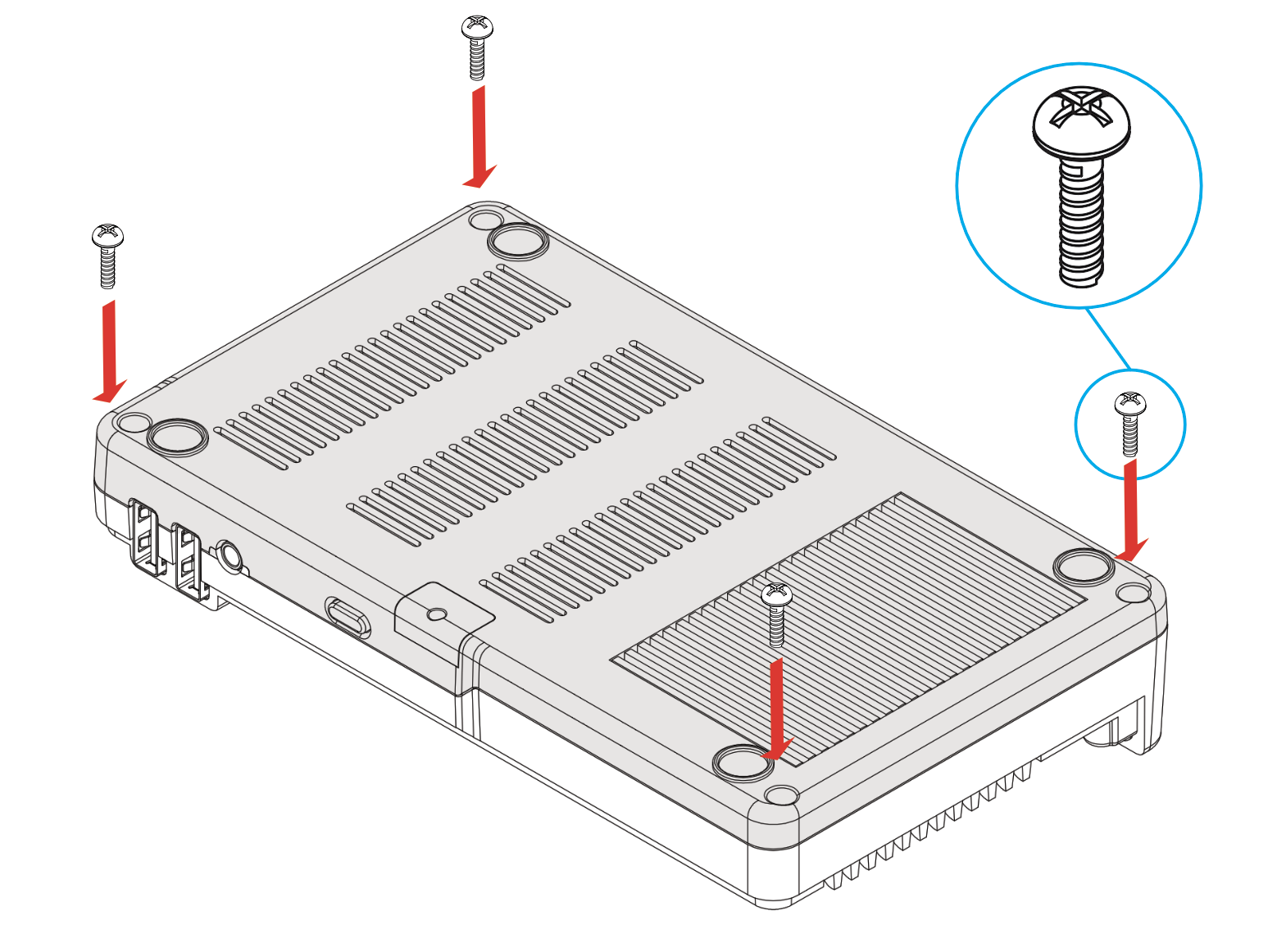
Attach the aluminum THRML heatsinks to the V5 bottom case, then secure the bottom panel with the 4 long round-head screws (M2.5 × 8 mm), one at each corner.
📝 Note: The THRML heatsinks mount to the underside of the NVMe drives and conduct heat into the aluminum bottom panel. Ensure the heatsinks make firm contact with the drive surfaces before tightening the bottom panel screws.
¶ Step 8 — Connect the PCIe Ribbon Connector
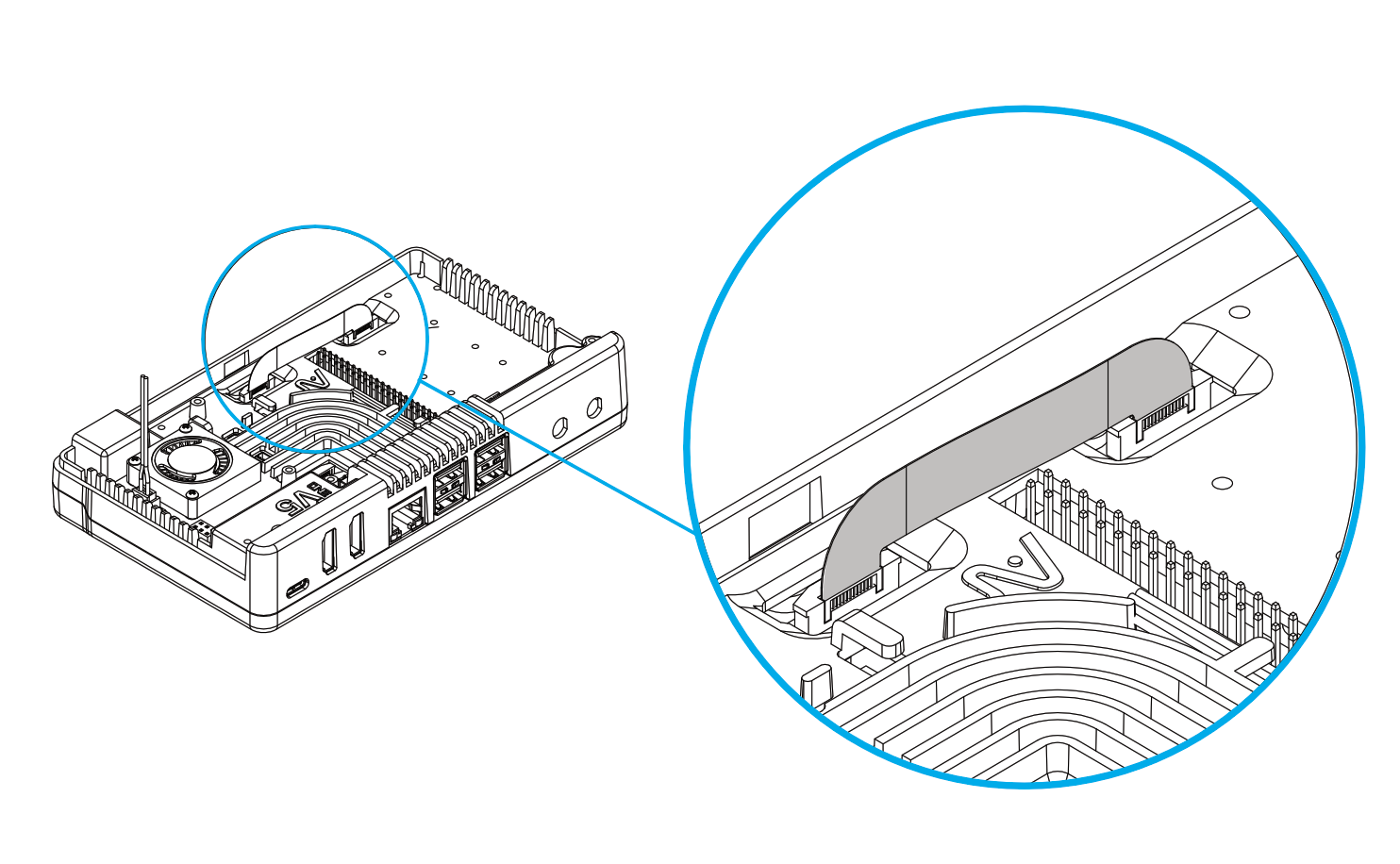
Connect the U-shaped PCIe connector between the NVMe board and the Raspberry Pi 5 PCIe port.
⚠️ Warning: The copper side of the U-shaped connector must face the white side of the Raspberry Pi 5 PCIe terminal. Inserting it reversed will prevent the NVMe drive from being detected and may damage the connector or the PCIe port.
📝 Note: Press the connector gently but firmly into both ports until it clicks or seats flush. A partially inserted connector is the most common cause of NVMe drives not appearing at boot.
¶ Step 9 — Install the OLED Module (Optional)
If you have purchased the Argon Industria V5 OLED Module:
- Remove the plastic V5 logo placeholder from the top of the case.
- Seat the OLED module in the opening.
- Connect the OLED module ribbon/connector to the first 8 GPIO pins (pins 1–8).
📝 Note: The OLED module only uses GPIO pins 1–8. Pins 9–40 remain fully available for other HATs or peripherals.

¶ Step 10 — Install the Zigbee Module (Optional)
If you have purchased the Argon Industria V5 Zigbee Module:
- Connect the Zigbee module to the internal 6-pin USB port inside the case.
⚠️ Warning: Installing the Zigbee module uses the internal 6-pin USB port and disables the leftmost front USB 2.0 port. Plan your peripheral connections accordingly before final assembly.
¶ Software & Configuration
¶ Installing the Argon ONE V5 Script
Before the fan controller, power button, and OLED features work correctly, you must install the Argon ONE V5 software. Two methods are available.
¶ Option 1: Automated Script (Recommended)
Make sure your Raspberry Pi 5 is connected to the internet, then run:
curl https://download.argon40.com/argon1v5.sh | bash
This script will:
- Automatically add the required settings to /boot/firmware/config.txt
- Install the Argon Configuration Tool (accessible via a desktop icon after reboot)
After installation, reboot for all settings to take effect:
sudo reboot
¶ Option 2: Manual Configuration
If you prefer to configure manually, edit the boot config file:
sudo nano /boot/firmware/config.txt
Add the following lines:
dtoverlay=dwc2,dr_mode=host
dtparam=uart0=on
dtparam=pciex1_gen=3
usb_max_current_enable=1
Save the file and reboot:
sudo reboot
¶ Additional Configuration for Gen 3 NVMe Boards (ASM2806 Chipset)
📝 Note: This section only applies if you are using the Dual Gen 3 or Quad Gen 3 NVMe board variants (ASM2806 chipset). Skip this section if you are using any Gen 2 board.
Gen 3 boards require an additional compatibility overlay. Edit the boot config file:
sudo nano /boot/firmware/config.txt
Add the following line:
dtoverlay=pciex1=compat=pi5,no-mip,mmio-hi
Save and reboot:
sudo reboot
⚠️ Warning: Without this overlay, Gen 3 NVMe boards (ASM2806) may not be detected or may fail to function correctly. Always add this entry when using Dual Gen 3 or Quad Gen 3 variants.
¶ Argon Configuration Tool
After installing the automated script, the Argon Configuration Tool is available from the desktop or terminal.
Launch from desktop: Click the icon labeled Argon ONE V5.
Uninstall (terminal):
argonone-uninstall
Uninstall (GUI): Click the Argon ONE V5 desktop icon and select Uninstall.
The tool allows you to:
- Set fan speed thresholds at defined CPU temperature steps
- Configure power button behavior (e.g., single press, double press, long press actions)
- Monitor NVMe drive status if the OLED module is installed
¶ Verifying NVMe Drive Detection
After booting, confirm your NVMe drive(s) are detected:
lsblk
You should see one or more nvme0n1, nvme1n1, etc. entries. If no NVMe devices appear, see Troubleshooting.
To check the PCIe link speed and confirm Gen 2 or Gen 3 operation:
sudo lspci -vvv
Look for the NVMe controller entry and confirm the LnkSta field shows the expected link speed (Speed 5GT/s for Gen 2, Speed 8GT/s for Gen 3) and width (Width x1).
¶ Troubleshooting
¶ NVMe Drive Not Detected at Boot
Symptom: lsblk shows no NVMe devices after boot.
Causes and fixes:
- U-shaped PCIe connector not fully seated — Power off, open the case, and firmly re-seat the connector at both ends. Confirm the copper side faces the white side of the Raspberry Pi 5 PCIe terminal.
- Connector inserted reversed — Power off and re-insert with correct orientation. See Step 8.
- Software not installed — Run the Argon ONE V5 automated install script and reboot. The required
dtparam=pciex1_gen=3entry in/boot/firmware/config.txtmust be present. - Gen 3 board missing overlay — If using a Dual Gen 3 or Quad Gen 3 board, confirm
dtoverlay=pciex1=compat=pi5,no-mip,mmio-hiis present in/boot/firmware/config.txt. - Drive not fully seated in M.2 slot — Power off, remove the bottom panel, and re-seat the SSD, ensuring it is fully inserted before tightening the retaining screw.
¶ Fan Not Spinning
Symptom: The 30mm fan does not spin at any CPU temperature.
Causes and fixes:
- Fan cable not connected — Confirm the fan cable is securely plugged into the Raspberry Pi 5 FAN port (see Step 4).
- Argon ONE V5 software not installed — The fan is PWM-controlled by the Argon daemon. Install the software using the automated script and reboot.
- Fan speed threshold set too high — Open the Argon Configuration Tool and lower the temperature threshold at which the fan activates.
- Defective fan — Test by briefly connecting the fan directly to 5V. If it does not spin, contact Argon 40 support. Or visit the link the troubleshooting guide for PWM fan
¶ Power Button Not Responding
Symptom: Pressing the power button does nothing, or the system does not shut down cleanly.
Causes and fixes:
- Argon ONE V5 software not installed — The power button requires the Argon daemon. Install the software and reboot.
- Button behavior not configured — Open the Argon Configuration Tool and confirm the desired action (shutdown, reboot, etc.) is assigned to the button press type you are using.
- System is frozen — A long press (≥5 seconds) forces a hard power cut as a fallback. Use this only as a last resort; it bypasses the clean shutdown sequence.
¶ Audio Not Working
Symptom: No audio output from the 3.5mm jack, or the audio device is not listed.
Causes and fixes:
- Wrong audio output selected — In Raspberry Pi OS, right-click the audio icon in the taskbar and select the HS100B or Argon ONE audio device as the output.
dtparam=uart0=onmissing — Confirm this line is present in/boot/firmware/config.txt. Re-run the automated script if unsure.- HDMI audio taking priority — If an HDMI display with audio is connected, the system may default to HDMI output. Switch the default output device in audio settings.
¶ System Shuts Down or Reboots Unexpectedly Under Load
Symptom: The Raspberry Pi 5 shuts down, throttles heavily, or reboots when running NVMe-intensive workloads or multiple drives simultaneously.
Causes and fixes:
- Insufficient power supply — A 27W USB-C Power Delivery supply is strongly recommended for multi-drive configurations. Replace any supply rated below 5V/5A.
- Supplemental NVMe power cable not connected — Dual and Quad drive boards require the black NVMe supplemental power cable. Confirm it is connected (see Step 5).
- Overheating — Check CPU temperature with
vcgencmd measure_temp. Ensure thermal pads are properly seated on the CPU, RP1, PMIC, and RAM chips, and that the fan is operating.
¶ OLED Display Not Working After Installation
Symptom: The OLED module is installed but shows no output.
Causes and fixes:
- Ribbon cable not fully seated — Power off and re-seat the OLED connector on GPIO pins 1–8. Confirm the connector is not offset by one pin.
- Argon ONE V5 software not installed — OLED output requires the Argon daemon. Install the software and reboot.
- Conflicting GPIO use — Confirm no other HAT or software is using GPIO pins 1–8 (SDA, SCL, and adjacent pins). Disable any conflicting overlays in
/boot/firmware/config.txt.
¶ Zigbee Module Not Detected in Home Assistant
Symptom: The Zigbee module is installed but does not appear as a device in Home Assistant.
Causes and fixes:
- Internal USB port not connected — Confirm the Zigbee module is firmly seated in the internal 6-pin USB port.
- Wrong integration selected — In Home Assistant, use the Zigbee Home Automation (ZHA) integration and select the correct serial port (typically
/dev/ttyUSBxor/dev/ttyACMx). - Leftmost USB port conflict — Installing the Zigbee module disables the leftmost front USB 2.0 port. If a device was previously connected there, move it to another port and restart Home Assistant.
¶ FAQ
Q: Can I use this case with a Raspberry Pi 4 or earlier?
No. The Argon ONE V5 NVMe is designed exclusively for the Raspberry Pi 5. The PCIe connector and case geometry are not compatible with any other Raspberry Pi model.
Q: Do I need an NVMe drive to use the case? Can I run from a microSD card?
Yes — the Raspberry Pi 5's microSD slot remains accessible when installed in the case. The NVMe expansion is optional. However, booting from an NVMe drive significantly improves OS responsiveness and I/O throughput compared to microSD.
Q: What is the difference between Gen 2 and Gen 3 NVMe board variants?
Gen 2 boards use the ASM1182e chip and operate at PCIe 2.0 speeds (up to ~500 MB/s per lane). Gen 3 boards use the ASM2806 chip for higher throughput. The Raspberry Pi 5 natively supports PCIe Gen 2; enabling Gen 3 requires an additional dtoverlay entry in /boot/firmware/config.txt (see Software & Configuration). In practice, Gen 3 mode on the Raspberry Pi 5 may not always yield the full theoretical Gen 3 throughput, as the Pi 5's PCIe interface is a single ×1 lane.
Q: Can I mix Gen 2 and Gen 3 NVMe drives in a multi-drive board?
The PCIe switch chip operates at a single generation. All drives connected to a Gen 2 board (ASM1182e) will operate at Gen 2 speeds regardless of drive capability. Similarly, all drives on a Gen 3 board (ASM2806) will operate under Gen 3 mode. Mixing drive generations within a single board is physically possible, but throughput is limited by the board's PCIe generation and the total available bandwidth of the ×1 lane shared across all slots.
Q: Will a high-performance quad NVMe setup saturate the PCIe ×1 bandwidth?
Yes, potentially. The Raspberry Pi 5 exposes a single PCIe ×1 lane, which all NVMe drives share through the switch chip. A single modern NVMe drive can saturate a PCIe ×1 Gen 2 link on its own. Quad configurations are best suited for workloads that benefit from multiple independent volumes (e.g., RAID arrays, separate OS and data partitions, or Home Assistant with bulk media storage) rather than maximum single-stream throughput.
Q: Is the GPIO header still usable with the case closed?
Yes. The Argon ONE V5 NVMe includes a full 40-pin GPIO passthrough header with a magnetic cover. The cover can be removed to connect HATs or peripherals. Note that the OLED module uses GPIO pins 1–8 if installed, and the fan uses the dedicated FAN header — neither blocks the main GPIO pins significantly. See Step 9 for OLED pin details.
Q: Can I boot directly from the NVMe drive instead of a microSD card?
Yes. The Raspberry Pi 5 supports NVMe boot natively. To enable it, update the bootloader using rpi-eeprom-update and set the boot order to prioritize NVMe. You can configure this with raspi-config under Advanced Options → Boot Order, or by editing the EEPROM config directly. A working microSD card with Raspberry Pi OS is required to perform the initial bootloader update.
Q: What power supply is recommended, and does it matter for single-drive use?
A 27W USB-C Power Delivery (5V/5A) supply is strongly recommended for all configurations. For single-drive use, a 15W (5V/3A) supply may be sufficient under light loads, but sustained NVMe activity and active fan operation can push total system draw beyond 15W. The Argon PWR GaN 27W and the Argon PWR UPS for Argon ONE V5 are tested compatible accessories.
¶ Confirmed Product Identity
| Field | Confirmed value |
|---|---|
| Model No. / MPN | A24-005-AR-V5-NVME-S |
| UPC / EAN | 5065019946164 |
| Product dimensions | 10.00 x 4.00 x 16.50 cm |
| Product weight (kg) | 0.355 |
| Category | ONE v5 |
| HTS code | 8473.30.5100 |
📋 Page Info
Revision: 3 · Published: 2026-08-05 07:26 UTC
Managed by Argon Wiki Tool · View live page